
Download WorldTimeBuddy – Time Zone Converter, Meeting Scheduler
Overview
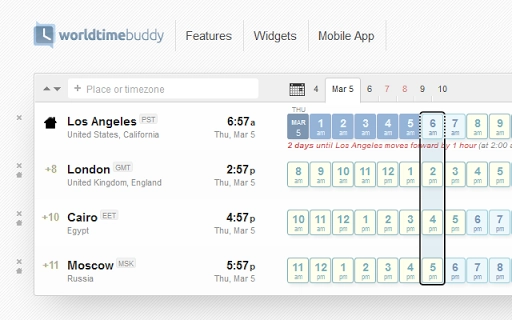
WorldTimeBuddy is a desktop productivity tool designed to simplify global scheduling for professionals and individuals managing international communications. The software enables seamless time zone conversion, helping users coordinate conference calls, online webinars, and cross-border meetings with precision. Its primary function is to eliminate confusion caused by time differences, particularly in distributed teams, remote work environments, and global collaborations.
The application is tailored for business professionals, project managers, educators, and anyone who regularly schedules events across multiple regions. By offering at-a-glance time comparisons and intelligent features like automatic home location detection, it streamlines the planning process. Real-world use cases include scheduling team check-ins across Europe, Asia, and the Americas, or organizing webinars with participants from diverse geographical locations.
Developed by WorldTimeBuddy, the software reflects a focus on usability and functionality for global users. While specific details about the development team are not provided, the tool’s integration with mobile platforms and continuous feature updates suggest an ongoing commitment to user experience. The software operates as a standalone desktop application, supporting Windows, Mac, and Linux, making it accessible across major operating systems.
Key Features & Capabilities
- At-a-glance time zone conversion – Provides a clear, visual comparison of current times across multiple locations, enabling quick decision-making during scheduling.
- Full daylight saving time (DST) support – Automatically adjusts for DST changes, ensuring accurate time calculations throughout the year.
- Advance warnings for DST transitions – Alerts users before time changes occur, helping prevent missed meetings due to unexpected shifts.
- Sharing of meeting or call times – Allows users to easily share selected time slots with others via links or export options.
- Drag-and-drop location sorting – Enables intuitive reordering of cities or regions to prioritize key participants in a meeting.
- Ticking clocks for each location – Displays live, real-time updates for each time zone, enhancing situational awareness during long planning sessions.
- Auto-detection of home location – Uses system settings to identify the user’s primary time zone, reducing setup time and minimizing errors.
These features collectively enhance workflow efficiency by reducing manual calculations and minimizing scheduling conflicts. For example, a project manager coordinating a team in London, Sydney, and Toronto can instantly see overlapping working hours. The tool also supports the creation of recurring meeting templates, ideal for regular international stand-ups.
User Interface, Workflow & Performance
The user interface of WorldTimeBuddy is designed for clarity and ease of use, featuring a clean layout that displays multiple time zones in a single view. Navigation is intuitive, with straightforward access to settings, location management, and sharing tools. The drag-and-drop functionality allows users to reorder locations without complex menus, improving overall usability.
Workflow efficiency is enhanced by the real-time ticking clocks, which provide continuous visual feedback on time progression across regions. This feature is particularly useful during extended planning sessions or when monitoring live events across time zones. The software maintains a responsive interface, ensuring smooth interactions even when managing a large number of locations.
Performance observations are based on general software behavior patterns. The developer did not specify resource usage details. However, given the application’s purpose and typical design of similar tools, it is expected to operate efficiently with minimal impact on system performance. Stability is assumed to be consistent with standard desktop applications, though exact details were not provided.
Compatibility & System Requirements
WorldTimeBuddy is compatible with Windows, Mac, and Linux operating systems, making it accessible to a broad user base. The software is available in version 1.0.0 and has a file size of 100 MB, indicating a moderate installation footprint. This size suggests the inclusion of essential features and possibly embedded resources for time zone data and UI elements.
Exact system requirements were not listed. The developer did not provide additional system requirements. Users are advised to ensure their system meets standard desktop application demands. Compatibility information was partially provided, but specific hardware specifications such as CPU, RAM, or GPU requirements are not available.
Pros and Cons
Pros
- Intuitive interface with real-time ticking clocks for clarity
- Automatic home location detection reduces setup time
- Full DST support with advance warnings for transitions
- Easy sharing of meeting times via links or export
- Drag-and-drop sorting for flexible location management
- Available on multiple platforms: Windows, Mac, Linux
Cons
- Exact system requirements were not specified
- Resource usage details (CPU/RAM) were not provided
- No information on cloud sync or calendar integration
- Offline functionality details are limited
FAQ Section
Is WorldTimeBuddy available for Windows, Mac, and Linux?
Yes, the software is compatible with Windows, Mac, and Linux operating systems, ensuring broad accessibility across desktop platforms.
Is the software free to download and use?
Yes, WorldTimeBuddy is offered at no cost. The application is free to download and use, with no subscription or hidden fees.
Does the software support daylight saving time changes?
Yes, the tool includes full daylight saving time (DST) support and provides advance warnings for upcoming transitions to prevent scheduling errors.
Can I share meeting times with others?
Yes, users can share selected meeting or call times with others through links or export options, facilitating collaboration across teams.
Is there a mobile version of WorldTimeBuddy?
Yes, a mobile version is available for iOS and Android devices. Additional details can be found at http://www.worldtimebuddy.com/mobile-app?cs.
Final Thoughts + CTA
WorldTimeBuddy delivers a focused, reliable solution for anyone navigating the complexities of international scheduling. Its clean interface, real-time clocks, and intelligent features like auto-location detection make it a practical choice for professionals managing global teams. While detailed technical specifications are limited, the software’s core functionality is well-executed and highly relevant in today’s remote-first work environment.
Users who frequently plan conference calls, webinars, or international meetings will benefit most from this tool. Its cross-platform availability and free access further enhance its value. With strong usability and a clear purpose, WorldTimeBuddy stands out as a dependable desktop utility in the productivity space.
Download WorldTimeBuddy now to simplify your global scheduling tasks and ensure every meeting starts on time.







